
Patch Extraction
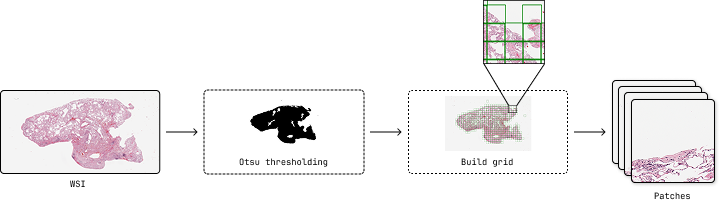
The patch extraction tool is the first step in the pipeline. It extracts patches from whole slide images (WSI) with configurable parameters for downstream analysis.
Overview
Patch extraction divides large whole slide images into smaller, manageable patches that can be processed by cell segmentation models. This step is crucial for handling the massive size of WSI files while maintaining spatial information.
CLI Usage
Basic Command
patch_extraction [OPTIONS]
Required Arguments
- --output_path PATH
Directory where extracted patches and metadata will be saved. The tool will create subdirectories for organizing the output.
- --wsi_path PATH
Path to the whole slide image file. Supports formats compatible with OpenSlide (SVS, TIFF, NDPI, etc.).
- --patch_size INTEGER
Size of patches to extract in pixels. Common values are 256, 512, 1024, or 2048.
- --patch_overlap FLOAT
Overlap percentage between adjacent patches (0.0-100.0). Higher values provide better coverage but increase processing time.
- --target_mag FLOAT
Target magnification for patch extraction.
Complete Example
patch_extraction \
    --output_path ./results \
    --wsi_path ./data/SLIDE_1.svs \
    --patch_size 1024 \
    --patch_overlap 6.25 \
    --target_mag 20.0
This command will:
Load the WSI file
SLIDE_1.svsResample to 20x magnification
Extract 1024x1024 pixel patches with 6.25% overlap
Save results to
./results/SLIDE_1/
Python API Usage
You can also use patch extraction programmatically in Python:
from cellmil.data import PatchExtractor
from cellmil.interfaces import PatchExtractorConfig
from pathlib import Path

# Create configuration
config = PatchExtractorConfig(
    output_path=Path("./results"),
    wsi_path=Path("./data/SLIDE_1.svs"),
    patch_size=1024,
    patch_overlap=6.25,
    target_mag=20.0
)

# Initialize extractor
extractor = PatchExtractor(config)

# Extract patches
extractor.get_patches()
Configuration Parameters
Patch Size Selection
The patch size determines the field of view for each extracted region:
256px: Faster processing, lower memory usage, may miss larger cellular structures
1024px: Captures more context, requires more memory and processing time
Overlap Considerations
Overlap between patches helps ensure complete coverage:
0%: No overlap, fastest processing, risk of missing edge cells
6.25%: Standard overlap, good balance of coverage and efficiency
25%: High overlap, thorough coverage, significantly more patches
Magnification Guidelines
Target magnification affects the level of detail captured:
20x: Good balance of detail and coverage.
40x: High detail, individual cell features clearly visible
Output Structure
The patch extraction creates the following directory structure:
output_path/
└── {slide_name}/
    ├── patches/
    │   ├── patch_0_0.png
    │   ├── patch_0_1.png
    │   ├── patch_1_0.png
    │   └── ...
    ├── ...
    └── thumbnail.png       # Slide thumbnail with patch overlay
File Descriptions
patches/: Directory containing individual patch images in PNG format
thumbnail.png: Overview image showing patch locations
Other files are generated for metadata and future processing steps.
Performance Considerations
Memory Usage
Memory requirements depend on:
Patch size: Larger patches require more RAM
Number of patches: Determined by slide size and overlap
WSI file size: Larger slides require more memory for loading
Processing Time
Factors affecting processing time:
WSI file size
Target magnification
Patch overlap percentage
Storage I/O speed
Troubleshooting
Error Messages
Error: Unable to open slide file
Solution: Check file path and format compatibility
Error: Insufficient disk space
Solution: Free up disk space or choose different output location
Error: Invalid magnification
Solution: Check available magnifications in the WSI file
Integration with Pipeline
Patch extraction is typically followed by:
Cell Segmentation: Process patches to identify individual cells
Feature Extraction: Extract features from segmented cells
MIL Analysis: Aggregate patch-level features for slide-level predictions
The output directory structure is designed to be compatible with subsequent pipeline steps.
See Also
Cell Segmentation - Next step in the pipeline
cellmil.data - API documentation for data handling
Quick Start - Quick start guide for the complete pipeline