
Graph Creation
The graph creation tool uses the cells segmentation location to build a spatial graph representation of the tissue architecture. This graph captures the relationships between individual cells based on their proximity and connectivity.
Available methods
K-Nearest Neighbors (KNN)
KNN is a popular method for graph construction, where each cell is connected to its K nearest neighbors based on spatial proximity.
The function is a wrapper around the function provided by torch_geometric :torch_geometric.nn.pool.knn_graph().
Radius-based
Radius-based graph construction connects each cell to all other cells within a specified radius.
The function is a wrapper around the function provided by torch_geometric :torch_geometric.nn.pool.radius_graph().
Delaunay Triangulation
Delaunay triangulation creates a graph by connecting cells based on the Delaunay criterion, which maximizes the minimum angle of the triangles formed.
This function makes use of function provided by scipy :scipy.spatial.Delaunay() for building the Delaunay triangulation. After, it constructs a graph by connecting the cells based on the triangles formed.
Nuclei Dilation
Nuclei dilation is a method that expands the boundaries of each cell’s nucleus to create a more inclusive graph representation.
This function is was heavily inspired by the QuPath process of cell instance segmentation which utilizes a similar approach for making cell boundaries.
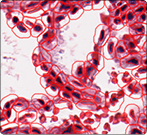
QuPath Cell boundary approximation.
Our method builds upon this concept by dilating the nuclei of the cell by a fix number of pixels and then checking for overlaps with neighboring cells.
Similarity
The similarity-based graph creation method connects cells based on a weighted sum or product of similarity of their morphological features and spatial proximity.
or
Where \(S_{ij}\) is the similarity score between cells \(i\) and \(j\), \(\alpha\) is a weighting factor, \(\text{FeatureSim}(i, j)\) is the similarity based on morphological features (from Morphometrics and Pyradiomics), and \(\text{SpatialSim}(i, j)\) is the spatial proximity measure.
CLI Usage
Note
⭐ indicates recommended options based on best practices and empirical results.
Basic Command
graph_creation [OPTIONS]
Required Arguments
- method {knn, radius, delaunay_radius, dilate}
Graph creation method to use.
knn: K-nearest neighbors graphradius: Radius-based graphdelaunay_radius: ⭐ Recommended. Balances local and global connectivitydilate: Nuclei dilation-based graphsimilarity: Similarity-based graph
- gpu: INTEGER
GPU device ID to use for computation.
- patched_slide_path PATH
Path to the directory containing segmentation results. This should contain the cell segmentation masks.
Optional Arguments
- plot
Whether to plot the graph after creation.
Complete Example
graph_creation --method delaunay_radius --gpu 0 --patched_slide_path /path/to/segmentation/results --segmentation_model cellvit
This command will:
Use the Delaunay radius method for graph creation (recommended).
Utilize GPU device 0 for computation.
Specify the path to the directory containing segmentation results.
Use the CellViT segmentation model for cell segmentation.
Python API Usage
from cellmil.interfaces import GraphCreatorConfig
from cellmil.graph import GraphCreator

config = GraphCreatorConfig(
    method="delaunay_radius",
    gpu=0,
    patched_slide_path=Path("/path/to/segmentation/results"),
    segmentation_model="cellvit",
    plot=True
)

graph_creator = GraphCreator(config)

graph = graph_creator.create_graph()
Output Structure
Graph creation creates the following files:
patched_slide_path/
└── graph/
    └── {model_name}/
        ├── graph.pt
        └── graph.png
File Descriptions
- graph.pt
The main graph file containing the graph structure and metadata.
- graph.png
A visual representation of the graph, useful for debugging and analysis.
Integration with Pipeline
Graph creation output is used by:
Feature Extraction: Extract morphological features from segmented cells
The standardized output format ensures compatibility with downstream tools.
See Also
Feature Extraction - Next step in the pipeline
cellmil.segmentation - API documentation
Quick Start - Complete pipeline overview